


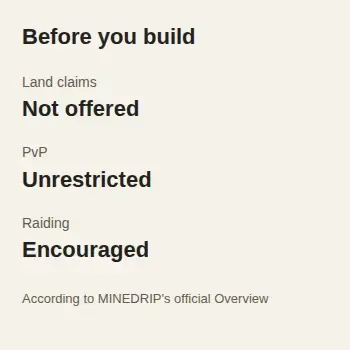
MINEDRIP is aimed at Java players who want survival with unrestricted PvP, raiding, and no land claims. That combination matters more than a long feature list: if you want a protected base or a server where another player cannot take your builds and resources, this is probably not the right fit.
The official server address is play.minedrip.com. MINEDRIP does not publish a clear list of supported Minecraft versions on its website, so check the current requirements before spending time on a base.
What kind of server is MINEDRIP?
MINEDRIP describes its world as survival with no land claims, unrestricted PvP, encouraged raiding, and a player-driven economy without admin shops. Those are the server’s own documented rules and design choices, not results from our own gameplay test.
The important consequence is simple: a home location is not the same as a protected claim. The official command list includes /sethome and /home, but neither command is documented as preventing another player from finding, damaging, or raiding a base. Building far from spawn does not establish protection either.
This makes MINEDRIP a possible fit if you enjoy risk, player conflict, and protecting your own resources. Choose another server if your main goal is a persistent build protected by land claims.
How to join MINEDRIP on Java Edition
- Open Minecraft: Java Edition.
- Select Multiplayer, then Add Server.
- Enter any useful name for the saved server entry.
- Enter
play.minedrip.comas the server address. - Save the entry, select it, and choose Join Server.
The address comes from MINEDRIP’s official website. The site does not provide a current accepted-version range, and this route has not been connection-tested for this article.
For a current directory listing, see MINEDRIP on Minecraft Server List.
If Minecraft rejects your version or the connection fails, do not treat a version shown by a third-party directory as guaranteed compatibility. Check the official MINEDRIP community for current help before changing versions or installing anything.
Your first session: read the current rules before building
Once connected, open chat and enter:
/rules
MINEDRIP’s command documentation says this opens the server rules. Read them before collecting valuable resources or starting a permanent base. If you still need help, enter:
/help
The intended result is access to the server’s current rules and help, not a particular response message. If /rules does not open, the rules are unclear, or an unfamiliar instruction asks you to download a file or share account details, stop. Use the official community link above to confirm the current requirements before continuing.
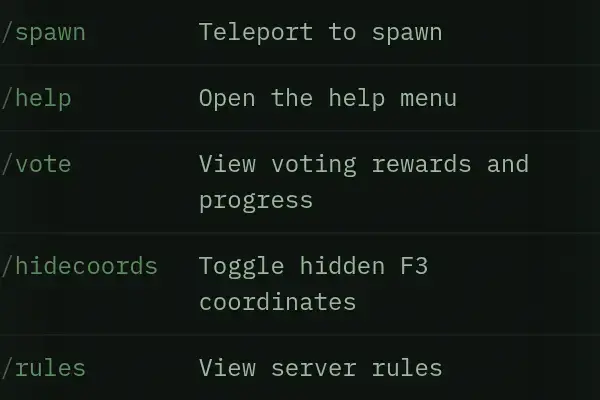
/help and /rules. Captured on 13 October 2026.What MINEDRIP does not clearly document
The public website does not currently give a clear reset or wipe schedule, accepted client-version range, or Bedrock address and port. It also does not establish permanent-death gameplay, despite using the label “HARDCORE”. The label “VANILLA+” is not enough to determine every mechanic or server-side change.
MINEDRIP also operates a store with paid ranks and other items. The public store confirms that purchases exist, but this article has not assessed their gameplay balance and does not recommend a purchase.
These unknowns should affect your decision. Confirm any point that matters to you before investing time in a base, especially reset policy, client compatibility, and paid benefits.
Is MINEDRIP right for you?
Consider MINEDRIP if open PvP, raiding, and the absence of protected land are part of the appeal. Skip it if you want claim protection, a documented Bedrock route, or a published reset schedule before joining.
For a broader set of options, browse the Minecraft server profiles and compare each server’s protection rules and joining requirements.